JobFlow - is workflow management software for Rural Contractors. Join us to give your perspective in the form of ideas; show your support for other ideas, share your knowledge, ask questions and raise tickets for improvements or bugs.

 Where do I change the charge out rates on a task?
I am trying to change the charge out rates on a task on a job, where do I changed these?

Thanks Dionne and Rachel for your query on this one:)
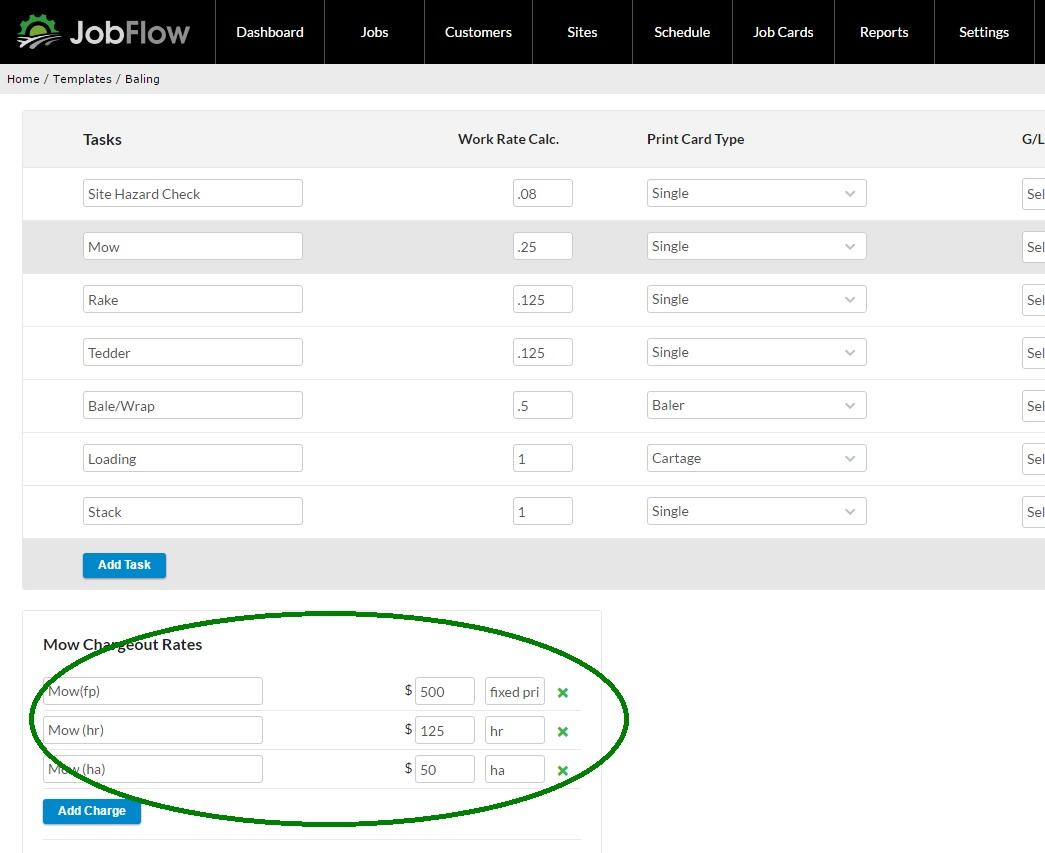
Go to Settings then Templates. Select the Job Template that the task is on, then select the Task.
This will bring up either to the right -> of the task or below as in the example the chargeout rates for that task. Here I have selected "Mow" and can now add or edit the Charge Out rates from here.
This description becomes your line description on your invoice, so if you are connected with Xero for it to be recognised you would make it the same as your product description there. You can always change it on the invoice to a correct product description if you need to.
Site Hazard Check - can we record this in JobFlow?
The first person to site (or each person) should be carrying out a site hazard check - how does JobFlow handle this?
 Scheduler - Group Jobs by Area
It would be fantastic if we could group jobs at a site location level by area so if we are travelling into that area we can see a job type eg "Maize Silage" all Job types by an area. This allows each contractor to define these as they like but not miss a job while working in an area.
Invoice Date - what date does JobFlow use as the invoice date?
What date does JobFlow use as an invoice date (which passes through to Xero or is printed on invoice? I think this should be job completed date (not job logged date or job started date).
The invoice is the date it a job status is set to "invoice".
We may need to pass a job "completed" date through to the invoice comments field(a new proposed field) as reference, as well as provide this on the billing summary for non-xero users. This way in Xero or your invoicing system you can change the invoice date if need be.
What are your thoughts?
 Adding a Task - Nested Exception Error
When adding a task to a job post job creation a nested exception error is occurring. You can add piece by piece and save and it avoids the error but if you enter the whole task, plus actuals and complete at once then select save the error occurs.
Invoice Output for Non-Xero Users (and Xero User Billing Summary) #276
When looking at a Job in the JobList we can "expand" or "hide" the details to review for invoicing. Be great if this information could be printed off as a billing summary for a non-Xero client,
Job Cards - Printed: Site Addresses Re-Arrangement
Job Cards are currently printing without a site address (partly because no site is defaulting when creating a new job and its not being added), and the destination address shows as the customer address which is not always the case.
Addresses and standard information on the printed card layout need to be reviewed and displayed logically.
Site addresses have been fixed to display as entered in the release Oct 5th. You can change the order the addresses display on a job and on a printed job card by dragging and dropping the addresses to re-position them on the job. Addresses where source or destination isnt select display in the order they appear as well but without "source" or " destination" labels.
Sites - Custom Maps eg Pinning on Google maps, GPS co-ordinates or link to farm map system
In JobFlow Google maps only takes us to the address on road. There are currently 3 ideas around how this could be improved to get drivers accurately to the right entry point for the farm from the road, and to the right paddock:
- allow ability to pin a position on google maps and save this back to JobFlow (currently works the other way, enter a address in JobFlow and it shows you this on google maps).
- allow the entry of GPS Co-ordinates to exactly pin the location on google maps.
- link to systems that have farm information eg. Tracmap, Precision Farming, Health & Safety systems that have farm maps etc already.
Give us your feedback on what your preference would be.
See topic: Site Information... for more information on what we are doing in the interim.
Site Information eg. Health & Safety, Farm/Custom Map
Another one in the top 6 request at Fieldays and RCNZ conference. Each site should store information relating to the site eg Custom Map (where is my entry point to the farm from the road), Farm Map (where do I go to get to paddock/location when on farm) or Health & Safety Information about the site.
We are reinstating the "add a custom map" feature to the site locations - this will allow a single image ( .jpg, .png) added BUT will replace the google map directions. While you could use this having your H&S information available in a dropbox (or cloud based storage) and linking to this from "Job Notes" is the reccomended work around at this point.
Paddock Identification- Job level
This one made it in the top 6 requests at Fieldays and RCNZ conference. Be great to have the ability to identify the paddock job was carried out on and for this information to be passed through to the invoice when billed.
We are re-arranging the order number field to record "Key Information" i.e the paddock id, keyword and/or order number and we are looking at moving this to differentiate the job or task in lists. eg John Smith - Spraying - P33, Headstart..#987654.
You can also use Job Comments to record the Paddock information, the advantage of the order number field is that this is limited in size and should be able to be added to help identify the job in the list as well as pass through to the invoice.
Customer support service by UserEcho